Building a Foundation with Lantus

Laddie_Head SquareMore than once I have written about using injections of Lantus in combination with an insulin pump. Although I have good results following this regimen, I tend to abandon it after a few weeks because it adds complexity and expense to my already complex and expensive diabetes life.

For those of you not familiar with the idea of using injections of a long-acting insulin along with pump therapy, this strategy is called the Untethered Regimen. It is described in a 2004 article by Dr. Steve Edelman as a plan where the user takes a pre-determined amount of basal insulin by injections of Lantus (or other long-acting insulin) and uses the pump for the rest of the daily basal requirement and for most or all of the required boluses. This approach allows a pumper to disconnect from the pump for long periods of time without worrying about erratic blood sugars and even DKA. The user still benefits from the flexibility of the pump with the ability to precisely dose for meals and corrections and to use temporary basals as needed.

In my previous experiments using the untethered regimen, I had the following pros:

  • Smoother basal action
  • Better pre-breakfast blood sugars
  • Fewer highs from changing infusion sets
  • Less risk of DKA
  • Ability to have pump-free time

Somehow the cons always won out and I went back to pumping 100% of my required insulin. The disadvantages I experienced were:

  • Hassle of shots on schedule
  • Not enough flexibility for temporary basals
  • Loss of prime on my Animas pump
  • Increased cost
  • Insulin plan more complex

So why I am rehashing this topic now? As you can probably guess, I am back using Lantus along with my pump. I have been struggling with overnight BG numbers for months, most noticeably spikes in the middle of the night followed by early morning lows. I have tried multiple changes in basal rates with little success. Similarly reducing evening snacks, changing my dinner menu, and giving up alcohol didn’t reliably fix the problem. My guess is that I have been dealing with a hormonal “dawn phenomenon,” but the pattern has not been reliable enough to make huge and somewhat scary increases to my overnight insulin.

About 10 days ago I decided to add Lantus to the mix. Rather than using two injections for 75% of my basals as I did in the past, I am giving 50% of my basal in one injection of Lantus at about 8:00PM. So far this is working great and I am not experiencing the negatives that I did in my previous Lantus trials. I’ve had night after night with few or no Dexcom alerts. I don’t need a “get-out-of-bed” bolus as I have required for several years to prevent my blood sugar from rising before I eat breakfast. My daytime BG’s have been more stable with fewer corrections required.

Untethered Regimen 2016

Why is it working so well? Magic, maybe. Actually I think that Lantus is providing a more stable foundation than the fluctuating pump rates I was previously using. I wonder if I have been experiencing pooling of insulin while asleep and that is not happening with Lantus. I have definitely been having itchy pump sites and even a few infections in recent months so maybe my insulin absorption has not been good. I suspect that whatever peak Lantus may have is matching up with my need for increased insulin in the early morning. Maybe I am just paying more attention to my diabetes and making better decisions over the things that I can control.

The fact is that although I don’t completely understand why, the untethered approach is working for me right now. When I wrote about this regimen previously, I was either using it temporarily for a beach vacation or calling it an “experiment.” I have a different feeling this time and can see it being a permanent change. Rather than feeling burdened by the scheduled Lantus injection, I feel a weird sort of freedom as BG numbers have been more consistent and less of a bother.

After having had Type 1 diabetes for almost 40 years, you’d think that I would have long ago given up on improving my diabetes care. I guess I’m just hard-headed or stupidly optimistic. Or maybe I just need to try new things to escape the boredom of a relentless day-to-day chronic illness. Whatever. The untethered regimen is working for me right now and that’s my story.

If you’re interested in learning more about the untethered regimen, check out the posts listed below.

Disclaimer: Nothing I say here should be construed as medical advice and please do not change your insulin regimen without consulting your medical team. At the same time remember that diabetes is a life-long science experiment (Thank-you Ginger Viera!). When things aren’t going well, take time to investigate different ways of eating and alternative ways of dosing your insulin. And no matter what, keep testing your blood sugar and always carry glucose tabs:-)

 ***  Related Posts  ***

Untethered at the Beach

The Grouch is Back!

The Lantus Experiment Part 1

The Lantus Experiment Part 2

Dexcom G5: Alerts & Sounds?

Laddie_Head SquareIn September I wrote a blogpost “Considering the Dexcom G5 Upgrade” which continues to be one of my most-read posts ever. My upgrade was free and it was a non-brainer to accept the two G5 transmitters. Because the G4 transmitter that I began using last March was still working fine until now, I have only just begun using a G5 transmitter. I am due to order a new transmitter next week (definitely trying to stock up before I transition to Medicare!)and I am glad to get some experience with the G5 before deciding whether to order a G4 or G5 transmitter.

So far I hate the G5 or at least how it functions on my iPhone 5.*** Maybe one of you canDexcom Sound Menu give me some help. As far as I can tell, there is no way to set Dexcom alerts to vibrate without having my whole phone on Vibrate Only. I find it hard to believe that “Vibrate” isn’t one of the sound choices on the phone as it is on the Dex receiver. But if it’s there, I don’t see it. If I turn off sounds for the Dex app in the phone notification settings, then it doesn’t vibrate either and losing alerts negates the major reason for using a CGM.
I like having a ringtone for my phone and I especially like a ding when I receive texts. So I don’t really want my phone on Vibrate Only. I find the Dexcom alerts incredibly loud and they don’t seem to respond to the volume adjustment of my ringer. I don’t want my day interrupted with diabetes sound blasts and I think that my husband, dog, golfing partners, and hiking friends would agree.

So unless I am missing something, I have 3 choices.

  1. Embrace the loud Dexcom alerts.
  2. Keep my phone on Vibrate Only with the risk of missing calls, texts, and calendar alerts.
  3. Use the Dexcom receiver instead of my phone or addition to my phone with phone alerts disabled.

I am not willing to go with Option 1. Diabetes intrudes into almost every moment of my life and I don’t want it accompanied by beeping, dinging, and babies-crying alerts.

I suspect that I can get used to Option 2 and that is what I am using today.

If I am going to use Option 3 then I should definitely just stay with the Dexcom G4 for my next transmitter with the longer battery life and no drop-dead date. Plus, I thought that the purpose of the G5 was to eliminate the receiver and use my smartphone instead!

So am I crazy and missing something obvious? Or is this another instance of “improved” medical devices taking a step backwards?

***Actually I like the Dexcom app on the phone and the ease of reading data and entering calibrations. But the lack of a Vibrate option is a big issue for me.

Hiking with Diabetes in 2016

Laddie_Head SquareOn January 1st I greeted the new year with a 9-mile hike in the Mazatzal Mountains near Sunflower, Arizona. I am an avid hiker and have written extensively about hiking with diabetes. You’ll find some of those posts listed at the bottom of the page.

Not a lot has changed with my hiking in 2016 except for two tech devices.

Dexcom Share:  I have often complained that the Dexcom G4 receiver is unreadable in bright sunlight. Animas pumps are even worse. I can’t see a darn thing on the screen. This year is my first experience hiking with the ability to see my Dexcom numbers on my iPhone. It’s fabulous. I can read the numbers with no effort at all. Now when my Dex receiver vibrates, I can pull out my phone to see whether it is a high or low alert and what the number is! Unfortunately I still can’t read my pump screen.

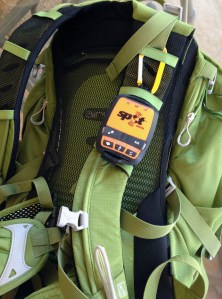
Spot Gen3 Tracker:  Despite my emphasis on safety, I have realized for several years that I was missing one device that a hiking group like mine should have. We are quite adventurous and most of our hikes are in mountainous areas with no cell phone coverage. If one of us were to get  injured or sick (or have issues due to Type 1 diabetes!), we’d basically be up Sh*t Creek. Most likely we would have to split up the group with some hiking out and driving to get help and others staying behind with the hiker-in-trouble. When you are 5-6 miles away from the car, this is not an ideal situation.

In response to my first hiking post in 2013, Scott Johnson mentioned a satellite-based SOS device that he had used for job-related drives in the boondocks. He wrote:

I think it’s wise to have the glucagon and prep the group. Hopefully you’ll never need any of it. But that’s one of the things about living with diabetes — we have to plan for the absolute worst case scenario.

When I was doing some work that involved a lot of driving in very remote areas I found a device/service called SPOT that used satellites to allow me to call for help, if needed, or broadcast an “I’m Ok” message to loved ones. Thankfully I never had to use the rescue service, but it provided great peace of mind.

Two and a half years later I am now the owner of a Spot Gen3 satellite tracker. According to the company website, the device “provides location-based messaging and Spot Tracker Photo_Croppedemergency notification technology that allows you to communicate from remote locations around the globe.”

That means that I can send out pre-programmed “I’m OK” messages to multiple phone numbers and email addresses. The two routine message options provide GPS coordinates and a link to Google Maps showing my exact location and track. There is a Help, but not life-threatening message that can be sent to designated contacts. Finally there is a SOS button that will summon a cavalry of emergency responders and helicopters.

I hope never to be in a situation where we must use the SOS alert. But if we face a life-threatening emergency, the cost of my annual Spot contract with be worth every dollar. (BTW I received my tracker free due to a pre-Christmas rebate contingent on purchasing an annual monitoring contract.)

Related Posts

Hiking with Diabetes Part 1

Hiking with Diabetes – Part 2

Short Hikes – Hiking with Diabetes Part 3

Oh Yes, I Can


Check It Out!

Laddie_Head SquareIt’s been a while since I’ve shared what I am reading and listening to. In the past couple of days I read one blogpost and listened to two podcast episodes that I think are worth your attention.

At the top of my bookmarks for non-diabetes blogs is a website titled Heart Sisters. This blog is self-described as “All about women and heart disease – our #1 killer – from the unique perspective of CAROLYN THOMAS, a Mayo Clinic-trained women’s health advocate, heart attack survivor, blogger, speaker.”

Currently I do not have heart disease although as a woman in her 60’s with Type 1 diabetes, I know that I am at risk. The appeal of this website for me has less to do with heart disease and more to do with the shared experiences of women (really all people) living with a chronic disease.

On October 17, Thomas published a blogpost titled “How Minimally Disruptive Medicine is happily disrupting health care.” She highlights the Mayo Clinic’s KER (Knowledge & Education Research) team led by Dr. Victor Montori. Dr. Montori is well-known for his discussions of the chronically-ill patient’s “burden of treatment” and is a proponent of eliminating terms such as “non-compliant” and “non-adherent.”

Heart Sisters 1

Those of us with diabetes are experts at recognizing the burden that our care places on our lives. Thomas shares a quote from a 46-year old woman (V. T. Tran interview) whose comments will hit home for many of us:

“There is stuff that I am SUPPOSED to do, and stuff that I actually DO.  If I did everything I am SUPPOSED to do, my life would revolve around doctors and tests and such and there wouldn’t be very much left for living my life.

I strongly urge you to read this blogpost and dream about an ideal world where medical professionals no longer blame patients and instead work towards patient health goals with a secondary emphasis on diagnostic test numbers.

***********************

Juicebox Podcast is an offshoot of the well-known diabetes parenting blog Arden’s Day. In 2007 Scott Benner began sharing life stories after his daughter Arden was diagnosed with Type 1 diabetes at age 2. Scott proudly proclaims that he is a stay-at-home dad and the author of Life Is Short, Laundry Is Eternal: Confessions of a Stay-At-Home Dad. Never one to shy away from a challenge, Benner began a podcast in early 2015 and named it after the numerous juiceboxes his daughter has consumed to treat low blood sugars.

This weekend while walking the dog, I listened to two Juicebox Podcast episodes which focused on Dexcom. Episode #27 was an interview with Kevin Sayer who is the CEO of Dexcom. Rather than recreate the wheel, I’ll share Scott’s synopsis of the episode: “Dexcom CEO Kevin Sayer talks about the Dexcom/Google collaboration, pump integration, Android and iOS/CGM in the Cloud issues, Medicare, Medicaid, Adhesive concerns…. Sayer was an open book who dished about things that I thought for sure he’d decline to speak about.”

Episode #28 was an interview with Steve Pacelli who is Dexcom’s Executive VP of Strategy & Corporate Development. Once again per Benner: “Just 24 hours after the surprise FDA approval of the Dexcom G5 continuous glucose monitoring system, I spoke with Dexcom EVP Steven Pacelli and asked him all of the questions that were submitted to me by my blog readers and podcast listeners – I even threw in a few of my own. If you’re wondering about Dexcom G5 upgrading, cost, out of pocket, battery life and more?”

Juicebox Podcast 1

Both of these Dexcom interviews were released in August and some of the G5 discussion is a bit dated. A minor point because both conversations are fascinating with insider views of Dexcom’s past, present, and future. I found Sayer’s discussion of the Google/Dexcom collaboration to be particularly interesting with his views on device miniaturization and the possibilities for the Type 2 market.

As an adult with Type 1 diabetes, I am not necessarily the Juicebox Podcast‘s target audience—parents of children with T1. Some of Benner’s interviews focus on parenting issues such as 504 plans/talking with school administrators and I skip those. Many are interviews with other T1 parents sharing their unique stories. I listen to and enjoy those podcasts while giving thanks that I live with Type 1 rather than my children. Finally there are interviews with people such as NASCAR driver Ryan Reed, American Idol contestant Adam Lasher, John Costik of Nightscout, and the two Dexcom executives that are interesting to anyone with a connection to diabetes.

I subscribe to the Jukebox Podcast through iTunes and new episodes are automatically downloaded to my iPhone podcast app. You can also listen to individual episodes through iTunes.

***********************

Summary:

Read this!  How Minimally Disruptive Medicine is happily disrupting health care

Listen to this!  Dexcom CEO Kevin Sayer Talks

Listen to this!  Dexcom G5 Approval with Dexcom EVP Steve Pacelli

Cracked Again

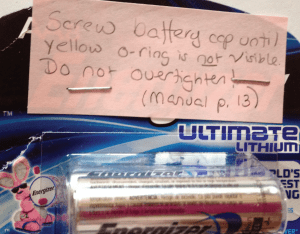
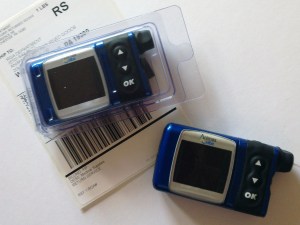
Laddie_Head SquareI just received a replacement Animas Vibe pump. At my last battery change, I discovered a crack in my pump from the top of the battery compartment down about 5/8 inch. Did I over-tighten the battery cap? I have no idea. Is it a design flaw or weakness in the type of plastic used for the pump case? Maybe. I would label it as an isolated problem but less than a year ago, I had my Animas Ping replaced for the same problem.

Animas Vibe Pumps2

In the seven years that I used Medtronic pumps, I cracked at least 3 pumps (maybe 4?). All of the cracks were in the exact same location: from the reservoir view window to the Esc button.Medtronic Pump Cracks

Maybe I am a kid who is rough with my pumps and break them whenever I wrestle and beat up my older sister. Nope. Maybe I get frustrated with diabetes and throw my pumps against cement walls whenever my BG tops 300. Nope. Maybe I have unlimited money and don’t take care of my diabetes devices. Nope.

So what is the truth? I am a middle-aged woman who will soon be called “old.” I line up my diabetes supplies in LIFO (last in, first out) order and never once in 39 years have I ever run out of supplies. I am not perfect at the diabetes game but I do a pretty good job. If nothing else, I am definitely mega-organized, methodical, and careful.

So what is the story?

After cracking the 3rd (or was it the 4th?) Medtronic pump, I spoke with a phone representative who told me that they would not replace any more pumps for me. Huh???  I called back a few days later and got a rep who asked how I was carrying my pump. I was using the Medtronic clip attached to my waistband as I had been ever since I started pumping. She suggested that after they replaced this pump that I should quit using the clip. She arranged for a free leather case (brown and ultra-masculine) which I hated. But from that day forward, I abandoned the Medtronic clip and began carrying the pump in my pocket. Never again did I crack a Medtronic pump. For whatever reason, the Medtronic clip on my waistband caused pumps to crack. For me. Obviously not for everyone. Medtronic pumps still ship with the same clip that for whatever reason didn’t work for me.

When I first started using the Animas Ping I got a few “No Delivery” (Loss of Prime???) error messages. It turned out that when I inserted the reservoir, I wasn’t pushing it in far enough or tightening the reservoir cap tight enough. With Medtronic I was always advised not to tighten things too tight. Whatever. I quickly learned to push Animas reservoirs in as far as I could and tighten the cap tightly. I have never had a reservoir error since then. So now I am cracking the pumps when I insert batteries. Am I over tightening them? I have no idea. But from now on, I will follow the Animas manual exactly as the photo below shows.Battery Insructions

So here I am. A middle-aged woman who has cracked 5 pumps in ten years of pumping. What happens with kids and teenagers who are rough with pumps? What happens with athletes who play football, hockey, and soccer? What happens with people whose pumps are randomly snatched by ceiling fans (Scott Johnson)? Although I hate to jinx myself, I have never had a pump failure. Just cracked cases. Except for the one rogue Medtronic rep, the pump companies have been fabulous in sending me new pumps as soon as possible.

So what’s the story? Is my experience mirrored by others on insulin pumps or am I just one rough, tough lady?

Beats me. As far as I am concerned, It’s just another day in a life with diabetes.

Considering the Dexcom G5 Upgrade

Laddie_Head SquareFor the first time in my diabetes tech history, I am in the golden upgrade zone. The FDA approval of the Dexcom G5™ Mobile CGM System was announced the same week that my G4 warranty expired. According to Dexcom’s upgrade program, I am entitled to a free upgrade to the G5 system if I purchased my G4 Platinum System with Share before the G5 begins shipping.

It was a no-brainer to order my new G4 system as soon as possible because I never want to run the risk of out-of-warranty equipment failing. Due to good insurance and the CGM rep at Edgepark (yes, I always have great service from Edgepark unlike so many others who report horror stories), my new CGM arrived within a week. At this point I began doing my homework about the upgrade options.

As I learned more about the G5 system, it quickly became apparent that it was not a slam-dunk decision to upgrade. I’ll discuss a few of my concerns below.

Pros of Upgrading

One Less Device:  I joke about diabetic pants and never buy clothes without pockets. I currently carry an insulin pump, glucose tabs, Fitbit, Dexcom receiver, occasionally car keys, and often my phone. The possibility of eliminating the Dex receiver is appealing.

Optional Receiver:  If I don’t like using my iPhone as my receiver, I can always use the G4 Share receiver updated with the G5 software.

Sunlight:  The G4 receiver with its black background is difficult to read in bright sunlight and the red color used for lows is almost invisible. My Animas Vibe pump is even worse and the text is totally unreadable in bright light. My phone has a better display and is easy to see in all light conditions. (Note: Now that I have the Share receiver, I have the option of using my phone without upgrading to the G5, but I would have to carry the receiver.) Because the G5 software upgrade will result in a new receiver display with a white background, maybe it will be easier to read in the sun than the current G4 device.

“Free” G4 transmitter:  Because my current G4 system is working, I have not had to Golden Upgradeopen the new G4 transmitter. I do not have to return this transmitter when I get the G5 transmitters and can keep it as a back-up to use with my current non-Share receiver. This is appealing as I get close to Medicare with no coverage for CGMS.

The Price is Right:  The upgrade is free!

Cons of Upgrading

Expiration of G5 transmitters:  My understanding is that the G5 transmitters will last 3 months and drop dead after 108 days (90 days plus an 18-day grace period). If you have good insurance coverage for CGMS, this is not a big deal. With no CGM coverage, the loss of an extended life for a transmitter can be a big deal.

Bigger Transmitter:  The G5 transmitter has built-in Bluetooth and is bigger than the current slim G4 receiver. It is about the size of the first generation G4 transmitter.

Not Compatible with Animas Vibe:  Although I rarely use my Vibe as a Dex receiver, I like having the option especially when I want a waterproof receiver at the pool or beach. Because Dex transmitters cannot be turned off, it’s expensive to use a G4 and G5 transmitter concurrently. I assume the lack of G5 compatibly will also extend to the new Tandem t:slim G4 combo.

Disadvantages of Phone Receiver:  My phone is much larger than the Dex receiver and doesn’t fit into many of my pockets. Although I use my phone a lot, I do not keep it with me day and night. I have no idea whether the sounds and vibrations of CGM alarms on the phone will be adequate. It will take more button pushes to access BG data on my phone compared to the one-button push of the Dex receiver.

Other Thoughts

Medicare:  I currently have excellent CGM coverage with private insurance. When I move to Medicare in April 2017, I will have to self-fund a CGM unless Medicare regulations change. My guess is that a G4 transmitter with the Animas Vibe or the Tandem t:slim G4 will be the least expensive option because no other receiver is required. As discussed in my April 2015 review of the Vibe, I am not a fan of the Dexcom integration into the Vibe. But it works and is an option. As far as I know, both pumps will continue to use the outdated G4 software instead of the 505 update.

It is possible that under Medicare the G5 will be an equally cost-effective device if I do not need to purchase a new receiver every year. The G5 was approved by the FDA with the requirement that a receiver be provided to new patients. Is that a one-time requirement or will G5 users be required to purchase a new receiver every year when the old one (maybe unused) goes out of warranty?

Staying Current:  New CGM devices are gaining FDA approval at a much faster pace than in the past. It is likely that both the G4 and G5 will be outdated in a few years and maybe my current decision is just not a big deal. With the Animas Vibe and t:slim G4 tied to the G4, my guess is that the original G4 transmitter will be available for many years to come. The G5 may be a short-lived device on the way to the G6 which promises improved accuracy and reliability along with mobile capabilities. Another consideration is what the new Dexcom/Google collaboration will bring to the table.

Decision Deadline:  The Dexcom website indicates that “Upgrade offers are available until 60 days after the first G5 Mobile shipment.” However, I learned that because I purchased my G4 Share system through a distributor (Edgepark), I have only 30 days from the date of shipment to upgrade. I am looking at an upgrade deadline of early October rather than late November. Good thing I asked!

My Decision

I have decided to upgrade and will be sent my G5 transmitters in October. At this point I will upgrade my Share receiver to the G5 software. For the most part I am choosing to abandon my Animas Vibe as a receiver and become more hip by never again being separated from my phone. Frankly I don’t know whether this is the right or wrong decision or if it even matters. Dexcom is making the change incredibly easy and I have just decided to go with the newest kid on the block. If nothing else, I am thankful for having the #firstworldproblem of choosing which CGM system to use. I promise to let you know how it goes.

Stuff and More Stuff

6th Annual Diabetes Blog Week

Today’s Topic:  Yesterday we kept stuff in, so today let’s clear stuff out.  What is in your diabetic closet that needs to be cleaned out?  This can be an actual physical belonging, or it can be something you’re mentally or emotionally hanging on to.  Why are you keeping it and why do you need to get rid of it?  (Thank you Rick of RA Diabetes for this topic suggestion.) To read all of the other posts in this category, click here.

Laddie_Head SquareI think that I took the easy way out with this topic and never addressed how to get rid of diabetes stuff–physical or mental. I just took photos and wrote about diabetes paraphernalia of which I have a lot. I’ll enjoy my free pass today and look forward to reading the more-on-topic posts by my fellow D-bloggers….

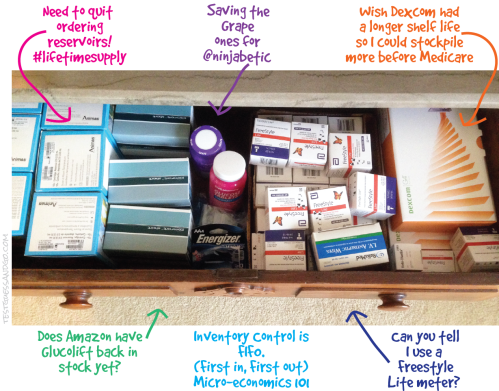
I keep backup diabetes supplies in two places. The first is a large drawer in my bedroom where pump supplies, meter strips, glucose tabs, spare batteries, etc. are stored. It is neat and tidy and except for the fact that I have too many boxes of reservoirs, it contains supplies that I will use soon.

Drawer Diabetes supplies

Down the hall there is a closet where diabetes gadgets and supplies go to die. Occasionally I end up retrieving and using a couple of the devices, but mostly it’s stuff that sits there for years and is finally thrown away. I seem addicted to keeping boxes and I can’t quite figure out why. On one hand I wish that I had kept every meter and lancet device that I have ever used so that I could have a personal museum. But since I didn’t, I have to question why I need multiple Dexcom boxes and a bottle of expired control solution.

Closet Diabetes Supplies

In case you’re interested, here is the current inventory:

1 Animas Vibe box (at least I threw away the Ping box), 1 Medtronic Revel box (it contains an old, but working pump), 4 Verio IQ meters (two were used for a while and two have never been opened), 2 One Touch Ultra Mini meters, 1 One Touch Ping meter/remote (I no longer own the pump, so why do I have the meter?), 1 One Touch Ultra Link meter, 3 Dexcom Kit boxes (1 for current receiver and 2 containing old receivers), 2 Dexcom transmitter boxes (containing old non-functional transmitters), 1 Brookstone travel hair dryer (in the diabetes section because its case looks like a meter case), 1 Freestyle Lite case (empty), 1 Freestyle Lite box (empty), 1 box Medtronic Silhouettes (half-empty), 1 box Medtronic Reservoirs (half-empty), 1 One Touch UltraSmart meter (was considered “smart” in its day), plastic bags of various cases and clips, and 1 plastic bag with a lancet device, lancets, and expired control solution.

On one hand it’s obscene how much “stuff” I have when there are adults and children around the world dying because they lack insulin and supplies. #SpareARose. There are also many people in the US, Canada, and abroad who have no insurance coverage for insulin pumps and CGMs. So I am indeed fortunate. However I get to whine a little. Can you believe all the crapola it takes to stay healthy with diabetes?!?!?!

Stepping Out with Diabetes and a Fitbit

Laddie_Head SquareThis is one of those posts where I need to state that I am not a medical professional and nothing I write should be considered medical advice. My aim is to share some ideas about how a Fitbit activity tracker fits into my life with diabetes.

*

In the last couple of weeks there has been chatter around the DOC about Fitbit and other activity trackers. Some of the talk has been about Fitbit challenges which are well-described in Kerri’s post at Six Until Me. I also wrote a post about one specific challenge.

Although I have enjoyed recent challenges, I owned a Fitbit for almost 2-1/2 years without linking it to social media. Even without friends and challenges, I found a Fitbit to be very motivating in an un-nagging sort of way. Although no one was monitoring whether I reached my daily goals, seeing the numbers tended to encourage me to take the dog for another walk or start using the upstairs bathroom to get extra steps (doin’ the Karen Graffeo).

I am a big fan of activity trackers when it comes to diabetes. Most of the things we PWDPump and Fitbit-001 are told to manage fall into the following areas:  diet, medication, exercise, BG monitoring, and psychosocial support. It is impossible to be perfect in any of these areas, but in my opinion the better I can do “on average,” the better I feel and the better my diabetes numbers are. For me there is no doubt that my Fitbit helps with the exercise component of my diabetes care.

Some of the reasons are:

Consistency:  Diabetes like consistency. By trying to reach my Fitbit step goal every day, my activity level is steadier than it would be without the device. Over time I believe that consistent exercise has resulted in lower and more predictable insulin requirements and I have fewer severe lows when I work out. At age 63 I can arrange my schedule to walk a few miles every day after breakfast and that exercise is reflected in my basal rates. If I skip the walk, I often set an increased temporary basal rate for a couple of hours.

Many of you are not be at a stage in life where you can exercise at the same time every day because jobs, children, weather, etc. demand your attention. At the same time you can work to be more active every day as you try to reach your step goal. Park your car at the far edge of the parking lot, take a longer route to the water cooler, walk around the house when you are on the phone, take a lunchtime walk. The advantage of an activity tracker is that you have data to monitor changes in your daily activity.

Motivation:  By starting with reasonable goals, I was able to achieve success right away. I have always enjoyed the weekly email I receive titled “Fitbit Weekly Stats.” This report gives me information on how many steps I walked the week before as well as total distance, averages, weight change if I choose to enter it into the website, and so on. Not every week is an improvement over the previous one, but in general my average daily steps have increased during the time that I have owned a Fitbit.

I am a believer that starting slow is fine and knowing your limitations is important. Some people have no problem achieving 10,000 steps per day. Others will work hard to reach 2,000 steps and their success is as admirable as those running marathons. Over time as you become more active, you can increase your goal if that makes sense for you. Or maybe your goal will stay the same and you can take pride is meeting that step count most days.

Easy to use:  Fitbits are simple to use. The Zip uses a disc battery which lasts for about 3-6 months. I have the One which is rechargeable with a USB cord. You can check out other models at the Fitbit website.

What is most fabulous is that the data from each tracker downloads automatically to the Fitbit website. When I open the app on my smartphone, it syncs automatically. I also have a USB wireless dongle connected to my desktop PC and the Fitbit syncs whenever I am within 15-20 feet of the computer. I don’t have to do a thing. (This is of course what I wish would happen with all of my diabetes devices….)

Fun:  I enjoy seeing my Fitbit stats whether or not I compare them with others. Challenges can motivate me to take more steps than usual, but at the same time I rarely win the challenges or even expect to. One thing I like about the challenge called Goal Day is that it is based on how each competitor does compared to his/her daily step goal. If my goal is 10,000 steps and yours is 2,000 and we each walk an extra 500 steps, you will crush me because you are at 125% of goal and I am only at 105%.

I have found everything about Fitbit reports and challenges to be positive. When I hit personal milestones, Fitbit rewards me with silly badges like the Penguin March for having cumulatively walked 70 miles or the Happy Hill for climbing 10 flights of stairs in a day. My experience with challenges has been that everyone is positive and supportive. I am awed at my personal stats on the Fitbit dashboard. FYI I have taken over 9,300,000 steps (4,200 miles) since I purchased my first Fitbit. My “best” day was April 5, 2013 when I walked 32,095 steps (a very long Arizona hike).

Diasend:  Diasend is an online system for uploading most diabetes devices except Medtronic products. It is a free service and all you need to do is set up a personal account. I use an Animas Vibe pump, a Dexcom G4, and several Freestyle meters. All can be uploaded to Diasend and there is Compilation report that displays all of this data in one report.

A new development is that I can link my Fitbit account to Diasend. (Other compatible activity trackers are the Moves App, Runkeeper, Jawbone Up, and Nike+.) Because my BG levels and insulin doses are highly dependent on activity level, it’s nice to see them in one report. Below you will see part of a two week report. (I have blocked out some of the data for personal reasons.) But you can see the potential for starting to track the effect of exercise on your diabetes numbers.

Diasend Compilation with Fitbit_1

If you currently use Diasend and don’t know how to link your activity tracker, click on the Account Admin tab and then select the tab that says “Browse & connect activity tracker.”

One caveat. When you first link your Fitbit, it starts with current data and includes no historical data. If you normally look at 2 weeks of data for your diabetes devices, the Activity data will not be correct until the link with Fitbit has been active for two weeks. But from then on your data will show up automatically. No download cables required.

Summary:  I am very happy with my Fitbit. If you are in the market for an activity tracker, you should probably check out all the brands. Some cell phones, including the iPhone 5S and 6-series, have activity trackers built into them. For the budget conscious, a basic pedometer is adequate to monitor your activity level and allow you to keep track of stats that interest and motivate you. Use whatever works for you.

If you can’t stand the idea of more numbers in your life, just ignore everything I wrote today. Put on your sneakers and take a walk. Take time to smell the roses and enjoy your day while secretly thinking that people like me are crazy.…

The Vibe After Two Months:  Part 3 — Pump Performance

Two and a half weeks ago I surprised myself. I was standing in the pool dodging grandchildren with noodles, inner tubes, and water cannons. Out of nowhere I began to envision the possibility that I might choose to stay with the Animas Vibe when I select my next insulin pump in late 2016. You’re probably thinking “Where in the heck did that come from?” Part 1 of this series was highly critical of the Vibe as a pump/CGM system. Part 2 detailed my frustrations with the klutzy hardware and software integration of the Dexcom G4 into the pump. So how in the world did I get to the point that not only do I not hate the Vibe, I am relatively happy with it.

*

Laddie_Head SquareI’ll start with a little history. In late 2012 I left Medtronic for Animas because I wanted upgrade access to the first pump to be released in the USA with a Dexcom integration. I had read a lot about the convoluted menus of the Animas Ping but figured that I would get used to them. Very quickly I figured out that I had greatly underestimated how much I would hate these menus. Over a year later I was still grouchy with my pump decision and frustrated with the constant scrolling, the need to populate each recommended bolus from zero, and the lack of a Back button.
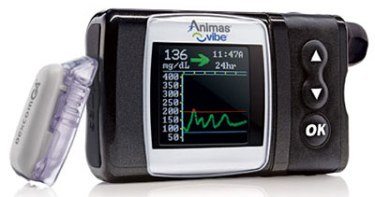
One day a couple months ago it dawned on me that I had become so adept at scrolling and button-pushing on the Ping that I didn’t hate it anymore. I still wondered what the Animas designers had been smoking when they designed the software system…. But I didn’t fight it anymore.

When I received the Vibe in mid-February, it didn’t take long for me to form negative opinions on the CGM integration into the device. At the same time the insulin-delivery functions of the pump were mostly fine and I daily appreciated the jump-to-bolus feature. In mid-March I quit using the Vibe as my CGM and went back to the Dexcom G4 receiver. This simplified my interactions with the Vibe and my satisfaction with the device increased quite a bit. Very importantly, it eliminated the nagging BG calibration alert. No more beeping after every bolus containing a BG number! I no longer had the frustration of the slow-refreshing graphs and I could mostly stay out of the no-man’s-land CGM menu. I began to concentrate on what I liked about the pump rather than my dislikes. At this point I was content that the Vibe was my pump until late 2016.

Let’s go back to the swimming pool. When you have diabetes, going swimming can entail a bunch of complex, usually no-win decisions. Should I risk wearing my pump until I jump in the water and what if I forget to take it off? Should I take some of my basal ahead of time? How long can I go without my pump and how much basal did I miss? What if someone knocks my pump off the table or steals it out of my tote bag? Using the Vibe allowed me to just keep using the pump in the water and not worry about diabetes issues. I could wear my swimsuit for several hours and be as relaxed as everyone else. (Although the Ping was also waterproof, I didn’t spend as much time in the pool as I do now and anticipate doing in future years.)

So all of a sudden I was standing in the pool and thinking that not only was I content with the Vibe now, I could see selecting it for my next pump in late 2016. Do I think it is the best pump ever? Absolutely not. But the menus are adequate, the pump is sturdy, and I really pump_animas_vibelike the fact that it is waterproof. Although I might not choose to use my CGM very often with the Vibe, it is a nice back-up option for times when I don’t want to carry the Dexcom receiver. (This point will be moot once the Dex G5 is released because a receiver won’t be required and it won’t be compatible with the Vibe.)

Would I sign a contract now for the Vibe in 2016? No. But because I will be a few months shy of Medicare when I make my next pump decision, the Omnipod and Snap will be off the table unless Medicare coverage changes. It is unlikely that I will leave Dexcom for the Medtronic CGM, so that essentially takes the newer Medtronic pumps out of contention. (At the same time I was super impressed when a got a chance to see the Medtronic 640G at the UnConference in March.) Accu-Chek is not a good fit for me and I refuse to use a tubed pump that requires a remote controller. So it will be the Animas Vibe versus Tandem (and maybe Medtronic?). Let the battles begin!

One thing that I have not talked much about in this post is the decision to leave the Ping to upgrade to the Vibe. Many Animas pumpers (or parents of pumpers) rely on the meter remote of the Ping and the lack of one becomes a deal breaker for the Vibe. I hated the remote and it was relegated to a dark closet several years ago. In my book everything about the Vibe is equal to or better than the Ping.

At the bottom of the post, I have attached a link to a sheet that I received from Animas highlighting the differences between the Vibe and the Ping. A lot of the changes relate to the addition of the CGM functions. The biggie for me is the one-button bolus population. I also like the ability to see my IOB with one button push. There are other menu changes that aren’t important to me and I still goof up with some of the new navigation arrows in the Setup, Status, and History menus. I have no interest in the Food list which is now in the pump, but others might like that feature.

In summary, I am mostly happy with the Vibe. For me it is a sturdy, reliable, waterproof pump that is not overly aggravating when I don’t activate the CGM functions. At the same time I believe that Animas missed the opportunity to design and release a  pump which could have hit a home run in the diabetes tech world. I have no idea if there are new pumps in the pipeline at Animas, but I hope so. As we see feature-rich pumps such as the Medtronic 640G and offerings from Tandem, Assante, and Omnipod hit the market, it is my opinion that the Vibe longterm will have a shrinking share of the insulin pump market.

Click this link to see a PDF scan of the Animas Vibe Features Guide In comparison to the OneTouch Ping insulin pump: Animas Vibe_Ping

The Vibe After Two Months:  Part 2 – CGM Integration

Laddie_Head SquareIn Part 1 of this series, I discussed how the Animas Vibe performs poorly as a system in real time. Although the pump and continuous glucose monitor (CGM) are housed in the same hardware, the menu system often strands the user in no-man’s land where it is cumbersome to switch between CGM and insulin delivery functions. The CGM works as advertised but just not as well as the actual Dexcom receiver. The pump does its job of delivering insulin safely and reliably but doesn’t interact with the CGM except through annoying calibration alerts. It’s all okay; it’s just not great and the CGM and pump don’t add much value to each other. Today’s post is my impressions of the Vibe as a CGM.

*

For the first month after I received my Animas Vibe, I used it exclusively as my CGM. The pump/CGM combo had some definite benefits, but the shortcomings drove me crazy and I went back to using my Dexcom receiver in Week 5. Rather than write a totally grouchy post, I will highlight some of the positives of the Vibe followed by my reality with those features.

The Positive:  The Vibe is the first insulin pump to be paired with the Dexcom G4 Platinum CGM.

The Reality:  My transmitter communicates well with the Vibe which is a reliable CGM receiver. Unfortunately by the time the Vibe was FDA-approved in November 2014, Dexcom had already released the 505 software update which will not be available to Vibe users. Looking at hardware, the Vibe was approved and ships with the 1st generation G4 transmitter despite the fact that the new low-profile transmitter is compatible. The highly anticipated G5 transmitter which will send data directly to a cell phone will not be compatible with the Vibe.

The Positive:  I like having one less device in my pocket when I leave the Dexcom receiver at home.

The Reality:  The software/hardware weaknesses of the Vibe result in a CGM device that is inferior to the Dexcom receiver. Some of the problems that I will discuss are small screen size, sluggish population of BG graphs, and multiple menus to navigate when shifting from CGM to pump functions.

The Positive:  I appreciate one-button access to the Data Screen which displays my BG number, the directional arrow, and my insulin-on-board (IOB) number.

The Reality:  The button is not a dedicated CGM button. When I am in the pump or CGM menus, it changes function and adjusts the brightness of the display. I hardly ever change the screen contrast and would prefer the ability to return to the CGM at any time with a one-button push.

The Positive:  The Vibe has a color, easy-to-read display.

The Reality:  I like the color display of the Vibe and have no problems with it indoors. Outdoors is another matter. I hike a lot in Arizona and shade is at a premium on the trail. I find that both the Vibe and the Dex receiver are unreadable in bright sunlight. This is a serious problem in my opinion and both Animas and Dexcom need to address the issue. One reason I should upgrade to the Dex Share receiver is that my iPhone is easy to read in any light conditions. (*2016 editPlease note that the Dexcom G5 receiver has corrected the sunlight problems of the G4.)

The Positive:  The Vibe is waterproof and has been a rugged device for me as was my Animas Ping.

The Reality:  That is my reality and kudos to Animas. Although I have not been using the Vibe CGM concurrently with my Dex receiver, I did so last week in anticipation of a Friday hike with numerous water crossings. It was a relief to leave the non-waterproof and more fragile Dexcom receiver at home. Although the transmitter signal is not necessarily reliable while swimming, it is a great option to have the ability to monitor your BG when in and out of the water.

The Positive:  The Vibe has customizable alarms for low and high blood sugars.

The Reality:  Some people prefer the Vibe alerts. Others prefer the Dex alerts. Some like having both devices active, especially at night. I don’t have a preference and miss very few alerts on either device.

The Positive:  You can download the Vibe to Diasend and see your pump and CGM data in compilation reports.

The Reality:  The reports are great and contain the same CGM data that a download of the Dexcom receiver provides. Unfortunately It is incredibly slow to download the Vibe. You need to unhook and suspend the pump and then use the awkward dongle device to send data to Diasend. I have an old Windows computer and the Animas download rarely works quickly for me. It usually takes five to seven minutes for a successful download. In comparison I can reliably download my Dex receiver to Diasend in 45 seconds.

My Main Gripes:

**** The CGM graphs are very slow to populate. Rather than pop up immediately, each graph appears as though someone is drawing it. After viewing the Data Screen as my starting screen, I like to see the 3-hour graph. I have to watch the 1-hour screen populate and then wait for the 3-hour graph to draw. The next time I push the CGM button with the pump in sleep mode, it will start with the screen I left off on during my previous session. So if I want to start my next session with the Data Screen, I have to go through the complete cycle of graphs (1-, 3-, 6-, 12-, 24-hour) or go back the way I came (1-, 3-, 1-hr) to return to that screen before the pump times out. Because of the tedious refreshing of the screens, I tend to stop looking at the graphs on the Vibe and stick with the Data Screen.  Essentially I start using my CGM in static mode. I see the BG number and directional arrow but have none of the historical context provided by the graphs.

**** A second problem with the Vibe CGM is that the display is small. The Dexcom receiver has a landscape rectangle screen. The black window of the Vibe appears to be a landscape rectangle until you see that the active part of the screen is square and actually a bit taller than wide. When you combine the small size of the graphs with the fact that the hatch marks have no time labels (for example 10AM, 8AM), it is difficult to interpret the graphs. The length of the BG tracing (not including the graph axis) on the Dex receiver is 1.5 inches. The length of the same line on the Vibe is .8125 inches which is just slightly more than half (54%) the width of the Dex.

**** A third problem with the CGM functions of the Vibe is that when I wake my pump through the CGM button, I am then in “no man’s land” in relation to the rest of my pump functions. From the Data Screen, I can either use directional arrows to see CGM graphs or press the OK button which takes me to the CGM menu. If I want to get to the Main Screen of the pump to bolus or adjust basal, I need to scroll down through the entire CGM menu before I can select the Main Menu.

Below you will find a video (my first ever!) showing the button-pushes to navigate through the Vibe menus. (Please ignore the gaps in the tracings which are primarily due to a new sensor start-up.)

**** A final problem is that the navigation of the CGM functions seems to ignore which features are more important and used most often. When I get an alert for a low or high blood sugar, it doesn’t display the number. I need to push OK to acknowledge the alert and that sends me to the CGM menu. It then highlights the top line which is BG Calibration. I then scroll down and select Trend Graphs to view my BG number. What is a one-button push on the Dex receiver is now a 3-button push. When you’re low, bg calibration is low priority!

**** One Vibe alert that I hate and am not able to silence is the calibration prompt. When the CGM is active and I input a blood glucose reading as part of a bolus calculation, it asks if I want to use the reading to calibrate. Although I can ignore the alert and it will time out, it always beeps. Originally I had my “Other” alerts set on vibrate, and this screen resulted in a series of four(!) vibrations. Since it is only one beep when I have it set on low, I don’t quite understand the four vibrations. Although a twice daily calibration is important for accurate CGM performance, the Vibe seems to give it unwarranted attention by placing it at the top of the CGM menu and then not allowing the elimination of the audio/vibration alarm.

Summary:

At the moment I expect that I will continue to use the Dexcom receiver and leave the CGM turned off on the Vibe. At the same time I appreciate the option to use the Vibe as a CGM and will occasionally use it for vacations, water activities, or when I want one less thing to carry. Maybe over time I will change my mind. If you are considering the Vibe, a great blogpost to read is by a Canadian T1 athlete who did change his mind and is now using the Vibe exclusively.

As much as I believe that Animas should have gone back to the drawing board before releasing a pump/CGM combo in the USA, it is still good to have another tech option for people with diabetes. Stay tuned for Part 3 of this series where I evaluate the Vibe as a standalone pump and discuss how it differs from its predecessor, the Animas Ping.