Stuff and More Stuff

6th Annual Diabetes Blog Week

Today’s Topic:  Yesterday we kept stuff in, so today let’s clear stuff out.  What is in your diabetic closet that needs to be cleaned out?  This can be an actual physical belonging, or it can be something you’re mentally or emotionally hanging on to.  Why are you keeping it and why do you need to get rid of it?  (Thank you Rick of RA Diabetes for this topic suggestion.) To read all of the other posts in this category, click here.

Laddie_Head SquareI think that I took the easy way out with this topic and never addressed how to get rid of diabetes stuff–physical or mental. I just took photos and wrote about diabetes paraphernalia of which I have a lot. I’ll enjoy my free pass today and look forward to reading the more-on-topic posts by my fellow D-bloggers….

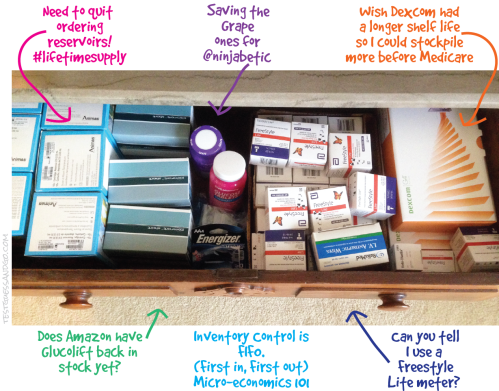
I keep backup diabetes supplies in two places. The first is a large drawer in my bedroom where pump supplies, meter strips, glucose tabs, spare batteries, etc. are stored. It is neat and tidy and except for the fact that I have too many boxes of reservoirs, it contains supplies that I will use soon.

Drawer Diabetes supplies

Down the hall there is a closet where diabetes gadgets and supplies go to die. Occasionally I end up retrieving and using a couple of the devices, but mostly it’s stuff that sits there for years and is finally thrown away. I seem addicted to keeping boxes and I can’t quite figure out why. On one hand I wish that I had kept every meter and lancet device that I have ever used so that I could have a personal museum. But since I didn’t, I have to question why I need multiple Dexcom boxes and a bottle of expired control solution.

Closet Diabetes Supplies

In case you’re interested, here is the current inventory:

1 Animas Vibe box (at least I threw away the Ping box), 1 Medtronic Revel box (it contains an old, but working pump), 4 Verio IQ meters (two were used for a while and two have never been opened), 2 One Touch Ultra Mini meters, 1 One Touch Ping meter/remote (I no longer own the pump, so why do I have the meter?), 1 One Touch Ultra Link meter, 3 Dexcom Kit boxes (1 for current receiver and 2 containing old receivers), 2 Dexcom transmitter boxes (containing old non-functional transmitters), 1 Brookstone travel hair dryer (in the diabetes section because its case looks like a meter case), 1 Freestyle Lite case (empty), 1 Freestyle Lite box (empty), 1 box Medtronic Silhouettes (half-empty), 1 box Medtronic Reservoirs (half-empty), 1 One Touch UltraSmart meter (was considered “smart” in its day), plastic bags of various cases and clips, and 1 plastic bag with a lancet device, lancets, and expired control solution.

On one hand it’s obscene how much “stuff” I have when there are adults and children around the world dying because they lack insulin and supplies. #SpareARose. There are also many people in the US, Canada, and abroad who have no insurance coverage for insulin pumps and CGMs. So I am indeed fortunate. However I get to whine a little. Can you believe all the crapola it takes to stay healthy with diabetes?!?!?!

Keeping It to Myself

6th Annual Diabetes Blog WeekToday’s Topic:  Many of us share lots of aspects of our diabetes lives online for the world to see.  What are some of the aspects of diabetes that you choose to keep private from the internet?  Or from your family and friends?  Why is it important to keep it to yourself?  (This is not an attempt to get you out of your comfort zone.  There is no need to elaborate or tell personal stories related to these aspects.  Simply let us know what kinds of stories we will never hear you tell, and why you won’t tell them.) (Thank you Scott E of Rolling in the D for this topic.) To read all of the other posts in this category, click here.

Laddie_Head SquareI have always kept most of my diabetes self-care tasks private. My sister and I both have Type 1 diabetes. She always injected (and still does) in front of others—usually in the middle of the kitchen. I always went somewhere private—usually the bathroom. I have never changed nor become comfortable giving my shots in front of others. What has changed is that I went on a pump and for the most part injections disappeared from my life. I don’t insert infusion sets in public or in front of my family, so I basically keep this stuff to myself.

I used to do all of my blood glucose testing in private and have at least mellowed on that through the years. I try to be discreet and will test with my kit in my lap at a restaurant. But I don’t unpack everything and set up a BG station on the table. Does this mean I am mired in shame over diabetes? No. Well….maybe a little bit. At the same time I am comfortable with keeping most of my diabetes tasks private and don’t feel much need to justify what is my comfort zone. I am not critical of other people’s decisions on how they handle their public diabetes persona. Do what works for you and I am okay with what works for me.

There is one story where many of you will strongly disagree with me. A few years ago there was a discussion on a diabetes message board (probably ADA or TuDiabetes) that resulted in lots of responses and quite a few arguments. A cousin (or the mother?) was planning her wedding and asked the original poster to not test or give injections at the table at the wedding dinner. Many of the responses to that scenario expressed outrage at Insensitive Cousinthe idea that this cousin would dictate this and suggested that the person refuse to do this or maybe just skip the wedding.

I would argue that long term the cousin and her mother need education on diabetes and maybe an extended course on good manners and compassion. At the same time it is just not that big a deal to me. My view would be that my cousin is a pain-in-the-neck bride-to-be, but I would be willing to honor her request. It is her wedding day and it is a small thing to find an isolated spot to test and inject for one day. I am willing to extend her the courtesy of not offending anyone with blood and gore and evil diabetes germs although I think she is wrong in asking this of me.

Before you start screaming, I know that this is a slippery slope. What if she asked me not to come because I am in a wheelchair? What if she asked me to leave my mixed-race husband at home? What if she asked me to wear Spanx because I am slightly overweight? What about another forum post where the mother of an adult T1 screamed at her child to leave the kitchen and always test her blood and inject in the bathroom?

I keep a lot of things to myself. In recent years the DOC has taught me to be more open about my diabetes and not to hide what I need to do to stay healthy. I think that we all have to fight our battles when and where we choose. No one wants to feel like a second-class citizen or ashamed of their diabetes. At the same time, I am a fan of occasionally leaving my indignation at home.

For sure, I am a work in progress.

Oh Yes, I Can

This is my second time participating in Diabetes Blog Week and like last year, I am overwhelmed at the idea of publishing a blogpost every day for seven days. In the middle of 2014 Blog Week, I secretly swore that I would never participate again. But I managed to stick with it. By the end of the week I was exhilarated with the passion and talent of my fellow diabetes bloggers and was proud to have participated. So here we go for the Sixth Annual Diabetes Blog Week! As always, thanks to Karen Graffeo of Bitter~Sweet™ for being the brains behind this project and organizing it for the sixth year.

6th Annual Diabetes Blog Week

Today’s Topic:  In the UK, there was a diabetes blog theme of “I can…”  that participants found wonderfully empowering.  So lets kick things off this year by looking at the positive side of our lives with diabetes.  What have you or your loved one accomplished, despite having diabetes, that you weren’t sure you could?  Or what have you done that you’ve been particularly proud of?  Or what good thing has diabetes brought into your life?  (Thank you to the anonymous person who submitted this topic suggestion.) To read all of the posts in this category, click here.

*********

Laddie_Head SquareI was ignorant about diabetes when I was diagnosed as a young adult in 1976. It never dawned on me that it would change the direction of my life and no one told me that it might limit anything that I hoped to do. As I sit here 38 years later, I like to think that I have not been held back by diabetes although I know that many things have been more difficult because of the constant demands of Type 1.

I think the one thing that I do that others are often amazed by is hiking. I spend a third of the year in Arizona and when I am there, I hike once or twice every week. My Friday hikes are not for the faint of heart and I join a group of friends on excursions that average 10-12 miles. Most of the hikes are in mountainous areas and often we are in areas with very little traffic and no cell phone coverage. The scenery is fabulous. The fellowship of this tight-knit group of women is inspiring. Every week is a challenge and I begin each season of hiking with the fear that this is the year that it will be “too hard” for me.

I have mixed feelings about how my Type 1 diabetes is viewed in this group. On one hand, I feel safe with these women because two of them are nurses and one has a sister with Type 1. The others are strong, confident women who wouldn’t faint at the sight of a Balanced RockGlucagon needle. I have never once felt that anything about my health is a burden to the group. The thing that makes me uneasy is the universal conviction that I am the model of someone who has her diabetes totally “in control.” It’s the idea that I “do diabetes” better than other people and the belief that I am somehow different from other people with diabetes.

I work hard at caring for myself, but I am a long ways from being perfect. My days are filled with good decisions peppered with less than optimal choices. I believe that I am lucky to have no severe complications after so many years of diabetes and I definitely know others who have not been as lucky. I realize that I have been the beneficiary of good insurance and have always had access to the hardware, supplies, and medications that allow me to live an active life. So I am uncomfortable being labeled “the good diabetic.”

At the same time I need to remember to take pride in what I do. I can hike because I work hard to stay in shape. I can hike safely because I am neurotically organized and am prepared with adequate food, water, and back-up diabetes supplies. I can hike because I am willing to push my boundaries while keeping a realistic view of my capabilities. I can hike because diabetes has been kinder to me than to some others. I can hike because…well, I just can.

Take that, Diabetes!

*

Related Posts

Hiking with Diabetes Part 1

Hiking with Diabetes Part 2

Short Hikes – Hiking with Diabetes Part 3

Stepping Out with Diabetes and a Fitbit

Laddie_Head SquareThis is one of those posts where I need to state that I am not a medical professional and nothing I write should be considered medical advice. My aim is to share some ideas about how a Fitbit activity tracker fits into my life with diabetes.

*

In the last couple of weeks there has been chatter around the DOC about Fitbit and other activity trackers. Some of the talk has been about Fitbit challenges which are well-described in Kerri’s post at Six Until Me. I also wrote a post about one specific challenge.

Although I have enjoyed recent challenges, I owned a Fitbit for almost 2-1/2 years without linking it to social media. Even without friends and challenges, I found a Fitbit to be very motivating in an un-nagging sort of way. Although no one was monitoring whether I reached my daily goals, seeing the numbers tended to encourage me to take the dog for another walk or start using the upstairs bathroom to get extra steps (doin’ the Karen Graffeo).

I am a big fan of activity trackers when it comes to diabetes. Most of the things we PWDPump and Fitbit-001 are told to manage fall into the following areas:  diet, medication, exercise, BG monitoring, and psychosocial support. It is impossible to be perfect in any of these areas, but in my opinion the better I can do “on average,” the better I feel and the better my diabetes numbers are. For me there is no doubt that my Fitbit helps with the exercise component of my diabetes care.

Some of the reasons are:

Consistency:  Diabetes like consistency. By trying to reach my Fitbit step goal every day, my activity level is steadier than it would be without the device. Over time I believe that consistent exercise has resulted in lower and more predictable insulin requirements and I have fewer severe lows when I work out. At age 63 I can arrange my schedule to walk a few miles every day after breakfast and that exercise is reflected in my basal rates. If I skip the walk, I often set an increased temporary basal rate for a couple of hours.

Many of you are not be at a stage in life where you can exercise at the same time every day because jobs, children, weather, etc. demand your attention. At the same time you can work to be more active every day as you try to reach your step goal. Park your car at the far edge of the parking lot, take a longer route to the water cooler, walk around the house when you are on the phone, take a lunchtime walk. The advantage of an activity tracker is that you have data to monitor changes in your daily activity.

Motivation:  By starting with reasonable goals, I was able to achieve success right away. I have always enjoyed the weekly email I receive titled “Fitbit Weekly Stats.” This report gives me information on how many steps I walked the week before as well as total distance, averages, weight change if I choose to enter it into the website, and so on. Not every week is an improvement over the previous one, but in general my average daily steps have increased during the time that I have owned a Fitbit.

I am a believer that starting slow is fine and knowing your limitations is important. Some people have no problem achieving 10,000 steps per day. Others will work hard to reach 2,000 steps and their success is as admirable as those running marathons. Over time as you become more active, you can increase your goal if that makes sense for you. Or maybe your goal will stay the same and you can take pride is meeting that step count most days.

Easy to use:  Fitbits are simple to use. The Zip uses a disc battery which lasts for about 3-6 months. I have the One which is rechargeable with a USB cord. You can check out other models at the Fitbit website.

What is most fabulous is that the data from each tracker downloads automatically to the Fitbit website. When I open the app on my smartphone, it syncs automatically. I also have a USB wireless dongle connected to my desktop PC and the Fitbit syncs whenever I am within 15-20 feet of the computer. I don’t have to do a thing. (This is of course what I wish would happen with all of my diabetes devices….)

Fun:  I enjoy seeing my Fitbit stats whether or not I compare them with others. Challenges can motivate me to take more steps than usual, but at the same time I rarely win the challenges or even expect to. One thing I like about the challenge called Goal Day is that it is based on how each competitor does compared to his/her daily step goal. If my goal is 10,000 steps and yours is 2,000 and we each walk an extra 500 steps, you will crush me because you are at 125% of goal and I am only at 105%.

I have found everything about Fitbit reports and challenges to be positive. When I hit personal milestones, Fitbit rewards me with silly badges like the Penguin March for having cumulatively walked 70 miles or the Happy Hill for climbing 10 flights of stairs in a day. My experience with challenges has been that everyone is positive and supportive. I am awed at my personal stats on the Fitbit dashboard. FYI I have taken over 9,300,000 steps (4,200 miles) since I purchased my first Fitbit. My “best” day was April 5, 2013 when I walked 32,095 steps (a very long Arizona hike).

Diasend:  Diasend is an online system for uploading most diabetes devices except Medtronic products. It is a free service and all you need to do is set up a personal account. I use an Animas Vibe pump, a Dexcom G4, and several Freestyle meters. All can be uploaded to Diasend and there is Compilation report that displays all of this data in one report.

A new development is that I can link my Fitbit account to Diasend. (Other compatible activity trackers are the Moves App, Runkeeper, Jawbone Up, and Nike+.) Because my BG levels and insulin doses are highly dependent on activity level, it’s nice to see them in one report. Below you will see part of a two week report. (I have blocked out some of the data for personal reasons.) But you can see the potential for starting to track the effect of exercise on your diabetes numbers.

Diasend Compilation with Fitbit_1

If you currently use Diasend and don’t know how to link your activity tracker, click on the Account Admin tab and then select the tab that says “Browse & connect activity tracker.”

One caveat. When you first link your Fitbit, it starts with current data and includes no historical data. If you normally look at 2 weeks of data for your diabetes devices, the Activity data will not be correct until the link with Fitbit has been active for two weeks. But from then on your data will show up automatically. No download cables required.

Summary:  I am very happy with my Fitbit. If you are in the market for an activity tracker, you should probably check out all the brands. Some cell phones, including the iPhone 5S and 6-series, have activity trackers built into them. For the budget conscious, a basic pedometer is adequate to monitor your activity level and allow you to keep track of stats that interest and motivate you. Use whatever works for you.

If you can’t stand the idea of more numbers in your life, just ignore everything I wrote today. Put on your sneakers and take a walk. Take time to smell the roses and enjoy your day while secretly thinking that people like me are crazy.…

Fitbit: A Challenging Week

Laddie_Head SquareI’ve been using a Fitbit for over two years. I originally purchased it to track hiking mileage but quickly started wearing it every day. Although I have enjoyed the weekly stat updates from Fitbit and definitely watched my steps on a daily basis, I have rarely used the social media aspects of the device. I had a couple of Fitbit Friends, but not too many interactions with them.

Last week I was invited to participate in my first Fitbit challenge called a Workweek Hustle. Total steps — Five days — Monday to Friday. Usually I say no to things like this because I don’t want to bother and am mostly self-motivated when it comes to reaching my fitness targets. But I figured I might as well give it a try even if I wasn’t sure what my goals were for participating. Cherise of DCAF/DSMA was the organizer and most of the participants were diabetes types. When the challenge started, I was still in Arizona where I am a step-monster walking the dog, hiking, biking, playing golf, and enjoying easy access to the outdoors. I flew back to Minnesota mid-week and although I keep the same goal of 10,000+ steps/day here, it sometimes take more planning to get to my target.

Because there is always social media trash-talk when you get into contests like this, I had fun from the beginning. On the first day I learned from Kerri that Ben (whom I didn’t know previously) was very “steppy” and she wasn’t kidding. From the beginning his step count was in the stratosphere and he ended up winning the challenge with a 5-day total of 176,727 steps (35,345/day). I don’t know whether he is a runner or walker fanatic, but using my steps/mileage ratio, he clocked in at least 16 miles a day (probably more because his stride might be longer than mine). Kerri was not too shabby with a 5-day total of 143,457 steps (28,691 steps /~13 miles) per day). She was focused on beating Ben up until the end.

Kerri and Ben were so far ahead of the pack that I didn’t compete with them; I just marveled at their statistics. The group itself had a big range of results, but we were all winners as the ten of us totaled 768,205 steps (~350 miles) for the week.

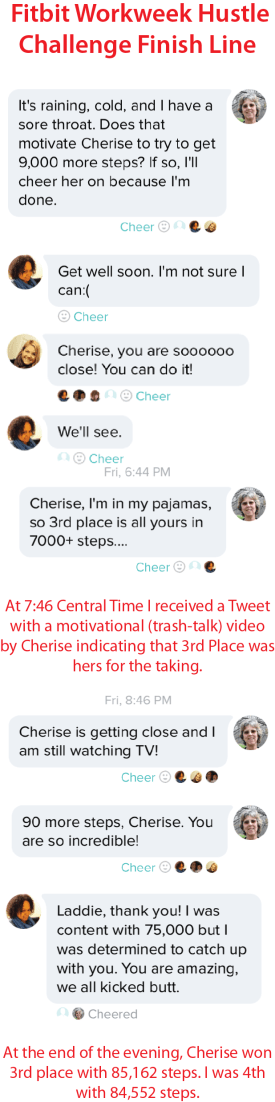
I had a firm lock on 3rd place moving into Friday afternoon. Thus began my favorite part of the challenge. The story is shared in the timeline below:

Fitbit Challenge Timeline

At the end of the day, I lost 3rd place in the Workweek Hustle. No, I won because I got to watch Cherise be a champion. She refused to rest until she clocked 23,000! steps on Friday and rocketed from 4th place to 3rd. One stubborn and competitive lady, that Cherise:-)

I won. I lost. But I won.

Here is a link to Cherise’s video. I don’t know whether you have to be a member of Twitter or a follower of @SweeterCherise to view it, but give it a try. On my laptop and desktop, the link works fine. On my iPad, I have to click the Tweet below the photo and then on the next screen, click on the arrow/TV icon on the upper right of the screen.

One of my next blogposts will be my views on how Fitbit and other step/fitness trackers can be a helpful, fun, and motivating part of your diabetes/general health regimen. That sentence sounds awfully preachy, but I promise (hope!) that the post will be better than that….

The Vibe After Two Months:  Part 3 — Pump Performance

Two and a half weeks ago I surprised myself. I was standing in the pool dodging grandchildren with noodles, inner tubes, and water cannons. Out of nowhere I began to envision the possibility that I might choose to stay with the Animas Vibe when I select my next insulin pump in late 2016. You’re probably thinking “Where in the heck did that come from?” Part 1 of this series was highly critical of the Vibe as a pump/CGM system. Part 2 detailed my frustrations with the klutzy hardware and software integration of the Dexcom G4 into the pump. So how in the world did I get to the point that not only do I not hate the Vibe, I am relatively happy with it.

*

Laddie_Head SquareI’ll start with a little history. In late 2012 I left Medtronic for Animas because I wanted upgrade access to the first pump to be released in the USA with a Dexcom integration. I had read a lot about the convoluted menus of the Animas Ping but figured that I would get used to them. Very quickly I figured out that I had greatly underestimated how much I would hate these menus. Over a year later I was still grouchy with my pump decision and frustrated with the constant scrolling, the need to populate each recommended bolus from zero, and the lack of a Back button.

One day a couple months ago it dawned on me that I had become so adept at scrolling and button-pushing on the Ping that I didn’t hate it anymore. I still wondered what the Animas designers had been smoking when they designed the software system…. But I didn’t fight it anymore.

When I received the Vibe in mid-February, it didn’t take long for me to form negative opinions on the CGM integration into the device. At the same time the insulin-delivery functions of the pump were mostly fine and I daily appreciated the jump-to-bolus feature. In mid-March I quit using the Vibe as my CGM and went back to the Dexcom G4 receiver. This simplified my interactions with the Vibe and my satisfaction with the device increased quite a bit. Very importantly, it eliminated the nagging BG calibration alert. No more beeping after every bolus containing a BG number! I no longer had the frustration of the slow-refreshing graphs and I could mostly stay out of the no-man’s-land CGM menu. I began to concentrate on what I liked about the pump rather than my dislikes. At this point I was content that the Vibe was my pump until late 2016.

Let’s go back to the swimming pool. When you have diabetes, going swimming can entail a bunch of complex, usually no-win decisions. Should I risk wearing my pump until I jump in the water and what if I forget to take it off? Should I take some of my basal ahead of time? How long can I go without my pump and how much basal did I miss? What if someone knocks my pump off the table or steals it out of my tote bag? Using the Vibe allowed me to just keep using the pump in the water and not worry about diabetes issues. I could wear my swimsuit for several hours and be as relaxed as everyone else. (Although the Ping was also waterproof, I didn’t spend as much time in the pool as I do now and anticipate doing in future years.)

So all of a sudden I was standing in the pool and thinking that not only was I content with the Vibe now, I could see selecting it for my next pump in late 2016. Do I think it is the best pump ever? Absolutely not. But the menus are adequate, the pump is sturdy, and I really pump_animas_vibelike the fact that it is waterproof. Although I might not choose to use my CGM very often with the Vibe, it is a nice back-up option for times when I don’t want to carry the Dexcom receiver. (This point will be moot once the Dex G5 is released because a receiver won’t be required and it won’t be compatible with the Vibe.)

Would I sign a contract now for the Vibe in 2016? No. But because I will be a few months shy of Medicare when I make my next pump decision, the Omnipod and Snap will be off the table unless Medicare coverage changes. It is unlikely that I will leave Dexcom for the Medtronic CGM, so that essentially takes the newer Medtronic pumps out of contention. (At the same time I was super impressed when a got a chance to see the Medtronic 640G at the UnConference in March.) Accu-Chek is not a good fit for me and I refuse to use a tubed pump that requires a remote controller. So it will be the Animas Vibe versus Tandem (and maybe Medtronic?). Let the battles begin!

One thing that I have not talked much about in this post is the decision to leave the Ping to upgrade to the Vibe. Many Animas pumpers (or parents of pumpers) rely on the meter remote of the Ping and the lack of one becomes a deal breaker for the Vibe. I hated the remote and it was relegated to a dark closet several years ago. In my book everything about the Vibe is equal to or better than the Ping.

At the bottom of the post, I have attached a link to a sheet that I received from Animas highlighting the differences between the Vibe and the Ping. A lot of the changes relate to the addition of the CGM functions. The biggie for me is the one-button bolus population. I also like the ability to see my IOB with one button push. There are other menu changes that aren’t important to me and I still goof up with some of the new navigation arrows in the Setup, Status, and History menus. I have no interest in the Food list which is now in the pump, but others might like that feature.

In summary, I am mostly happy with the Vibe. For me it is a sturdy, reliable, waterproof pump that is not overly aggravating when I don’t activate the CGM functions. At the same time I believe that Animas missed the opportunity to design and release a  pump which could have hit a home run in the diabetes tech world. I have no idea if there are new pumps in the pipeline at Animas, but I hope so. As we see feature-rich pumps such as the Medtronic 640G and offerings from Tandem, Assante, and Omnipod hit the market, it is my opinion that the Vibe longterm will have a shrinking share of the insulin pump market.

Click this link to see a PDF scan of the Animas Vibe Features Guide In comparison to the OneTouch Ping insulin pump: Animas Vibe_Ping

The Vibe After Two Months:  Part 2 – CGM Integration

Laddie_Head SquareIn Part 1 of this series, I discussed how the Animas Vibe performs poorly as a system in real time. Although the pump and continuous glucose monitor (CGM) are housed in the same hardware, the menu system often strands the user in no-man’s land where it is cumbersome to switch between CGM and insulin delivery functions. The CGM works as advertised but just not as well as the actual Dexcom receiver. The pump does its job of delivering insulin safely and reliably but doesn’t interact with the CGM except through annoying calibration alerts. It’s all okay; it’s just not great and the CGM and pump don’t add much value to each other. Today’s post is my impressions of the Vibe as a CGM.

*

For the first month after I received my Animas Vibe, I used it exclusively as my CGM. The pump/CGM combo had some definite benefits, but the shortcomings drove me crazy and I went back to using my Dexcom receiver in Week 5. Rather than write a totally grouchy post, I will highlight some of the positives of the Vibe followed by my reality with those features.

The Positive:  The Vibe is the first insulin pump to be paired with the Dexcom G4 Platinum CGM.

The Reality:  My transmitter communicates well with the Vibe which is a reliable CGM receiver. Unfortunately by the time the Vibe was FDA-approved in November 2014, Dexcom had already released the 505 software update which will not be available to Vibe users. Looking at hardware, the Vibe was approved and ships with the 1st generation G4 transmitter despite the fact that the new low-profile transmitter is compatible. The highly anticipated G5 transmitter which will send data directly to a cell phone will not be compatible with the Vibe.

The Positive:  I like having one less device in my pocket when I leave the Dexcom receiver at home.

The Reality:  The software/hardware weaknesses of the Vibe result in a CGM device that is inferior to the Dexcom receiver. Some of the problems that I will discuss are small screen size, sluggish population of BG graphs, and multiple menus to navigate when shifting from CGM to pump functions.

The Positive:  I appreciate one-button access to the Data Screen which displays my BG number, the directional arrow, and my insulin-on-board (IOB) number.

The Reality:  The button is not a dedicated CGM button. When I am in the pump or CGM menus, it changes function and adjusts the brightness of the display. I hardly ever change the screen contrast and would prefer the ability to return to the CGM at any time with a one-button push.

The Positive:  The Vibe has a color, easy-to-read display.

The Reality:  I like the color display of the Vibe and have no problems with it indoors. Outdoors is another matter. I hike a lot in Arizona and shade is at a premium on the trail. I find that both the Vibe and the Dex receiver are unreadable in bright sunlight. This is a serious problem in my opinion and both Animas and Dexcom need to address the issue. One reason I should upgrade to the Dex Share receiver is that my iPhone is easy to read in any light conditions. (*2016 editPlease note that the Dexcom G5 receiver has corrected the sunlight problems of the G4.)

The Positive:  The Vibe is waterproof and has been a rugged device for me as was my Animas Ping.

The Reality:  That is my reality and kudos to Animas. Although I have not been using the Vibe CGM concurrently with my Dex receiver, I did so last week in anticipation of a Friday hike with numerous water crossings. It was a relief to leave the non-waterproof and more fragile Dexcom receiver at home. Although the transmitter signal is not necessarily reliable while swimming, it is a great option to have the ability to monitor your BG when in and out of the water.

The Positive:  The Vibe has customizable alarms for low and high blood sugars.

The Reality:  Some people prefer the Vibe alerts. Others prefer the Dex alerts. Some like having both devices active, especially at night. I don’t have a preference and miss very few alerts on either device.

The Positive:  You can download the Vibe to Diasend and see your pump and CGM data in compilation reports.

The Reality:  The reports are great and contain the same CGM data that a download of the Dexcom receiver provides. Unfortunately It is incredibly slow to download the Vibe. You need to unhook and suspend the pump and then use the awkward dongle device to send data to Diasend. I have an old Windows computer and the Animas download rarely works quickly for me. It usually takes five to seven minutes for a successful download. In comparison I can reliably download my Dex receiver to Diasend in 45 seconds.

My Main Gripes:

**** The CGM graphs are very slow to populate. Rather than pop up immediately, each graph appears as though someone is drawing it. After viewing the Data Screen as my starting screen, I like to see the 3-hour graph. I have to watch the 1-hour screen populate and then wait for the 3-hour graph to draw. The next time I push the CGM button with the pump in sleep mode, it will start with the screen I left off on during my previous session. So if I want to start my next session with the Data Screen, I have to go through the complete cycle of graphs (1-, 3-, 6-, 12-, 24-hour) or go back the way I came (1-, 3-, 1-hr) to return to that screen before the pump times out. Because of the tedious refreshing of the screens, I tend to stop looking at the graphs on the Vibe and stick with the Data Screen.  Essentially I start using my CGM in static mode. I see the BG number and directional arrow but have none of the historical context provided by the graphs.

**** A second problem with the Vibe CGM is that the display is small. The Dexcom receiver has a landscape rectangle screen. The black window of the Vibe appears to be a landscape rectangle until you see that the active part of the screen is square and actually a bit taller than wide. When you combine the small size of the graphs with the fact that the hatch marks have no time labels (for example 10AM, 8AM), it is difficult to interpret the graphs. The length of the BG tracing (not including the graph axis) on the Dex receiver is 1.5 inches. The length of the same line on the Vibe is .8125 inches which is just slightly more than half (54%) the width of the Dex.

**** A third problem with the CGM functions of the Vibe is that when I wake my pump through the CGM button, I am then in “no man’s land” in relation to the rest of my pump functions. From the Data Screen, I can either use directional arrows to see CGM graphs or press the OK button which takes me to the CGM menu. If I want to get to the Main Screen of the pump to bolus or adjust basal, I need to scroll down through the entire CGM menu before I can select the Main Menu.

Below you will find a video (my first ever!) showing the button-pushes to navigate through the Vibe menus. (Please ignore the gaps in the tracings which are primarily due to a new sensor start-up.)

**** A final problem is that the navigation of the CGM functions seems to ignore which features are more important and used most often. When I get an alert for a low or high blood sugar, it doesn’t display the number. I need to push OK to acknowledge the alert and that sends me to the CGM menu. It then highlights the top line which is BG Calibration. I then scroll down and select Trend Graphs to view my BG number. What is a one-button push on the Dex receiver is now a 3-button push. When you’re low, bg calibration is low priority!

**** One Vibe alert that I hate and am not able to silence is the calibration prompt. When the CGM is active and I input a blood glucose reading as part of a bolus calculation, it asks if I want to use the reading to calibrate. Although I can ignore the alert and it will time out, it always beeps. Originally I had my “Other” alerts set on vibrate, and this screen resulted in a series of four(!) vibrations. Since it is only one beep when I have it set on low, I don’t quite understand the four vibrations. Although a twice daily calibration is important for accurate CGM performance, the Vibe seems to give it unwarranted attention by placing it at the top of the CGM menu and then not allowing the elimination of the audio/vibration alarm.

Summary:

At the moment I expect that I will continue to use the Dexcom receiver and leave the CGM turned off on the Vibe. At the same time I appreciate the option to use the Vibe as a CGM and will occasionally use it for vacations, water activities, or when I want one less thing to carry. Maybe over time I will change my mind. If you are considering the Vibe, a great blogpost to read is by a Canadian T1 athlete who did change his mind and is now using the Vibe exclusively.

As much as I believe that Animas should have gone back to the drawing board before releasing a pump/CGM combo in the USA, it is still good to have another tech option for people with diabetes. Stay tuned for Part 3 of this series where I evaluate the Vibe as a standalone pump and discuss how it differs from its predecessor, the Animas Ping.


The Vibe After Two Months:  Part 1 – Report Card

Laddie_Head SquareI have been using the Animas Vibe for two months. I believe that the decision to upgrade from my two-year old Ping was a good one and I am content that this will be my pump until the warranty expires in November 2016. The basis of this satisfaction surprises me because the reasons I like the pump have little to do with why I thought I wanted it.

I am writing a 3-part series about my experience. Today will be an overall report card for the Vibe, primarily discussing whether it makes the grade as a pump/CGM system. Part 2 will be an evaluation of how the Vibe performs as a CGM receiver. Part 3 will be an evaluation of the Vibe as a stand-alone pump.

*

In November 2012 I made the decision to purchase the Animas Ping because it was in line to be the first pump integrated with a Dexcom CGM. Despite poor results with the Medtronic SofSensors, I had really liked the integration of CGM data into my Revel pump. After using a Medtronic pump along with a Dexcom CGM for several years, I strongly believed that I wanted a single device merging my insulin pump and CGM.

When the Vibe was finally released in January 2015, I began to question the wisdom of following through with the upgrade. I was concerned that the CGM software was already out-of-date, that future Dexcom transmitters would lack compatibility with the Vibe, and that I might have insurance problems getting a new CGM system because the Vibe functions as a CGM receiver. After meeting with an Animas Rep in early February, I made the decision to follow through with the upgrade. You can read about that decision and my early impressions of the pump here.

After two months, I am happy with the Vibe as a pump, but I am back to using the Dexcom receiver full-time. In my opinion, the Vibe gets a poor grade as a SYSTEM in real time and earns a good grade in reviewal made. To clarify, the integration of the CGM into what is essentially an Animas Ping pump is clumsy and occasionally nonsensical when it comes to the decisions/actions that I make with my pump and CGM on a daily basis. It is difficult to move from the CGM functions of the device to the insulin pump functions. Unlike the Medtronic “system”, there is no meter that sends BG numbers automatically to the pump. At the same time because I can download the Vibe to Diasend along with my BG meters, Dexcom receiver, and now even my Fitbit (!), I have a great platform for merging and reviewing my diabetes and health data.

In a January review of the Vibe, Mike Hoskins of Diabetes Mine mentioned that his Animas trainer talked about the Vibe “in terms of a dwelling — the two components used to be separate housing units, but now they co-exist under the same roof and are more like different rooms within one big home.” That is a great image, but I take it even further to say that the Vibe is a duplex with the pump in one unit and the CGM in the other. They are adjacent to each other, but they have separate entrances and there are no adjoining doors. To get from one device to the other, you must go outside and walk down the sidewalk to the other side of the building. Rather than adding value to each other, I find that the CGM part of the Vibe makes the pump functions more cumbersome than they are when the CGM is disabled.

Duplex Vibe

The only time that the Vibe works well as a system is when all of my devices have been downloaded to Diasend. In reviewal mode, it is a success because I can see reports merging  pump and meter data with my CGM. Unfortunately it is time-consuming to download everything (especially the Vibe) to Diasend, so it is unlikely that I will do this frequently. I am starting to get a little cyborg excitement envisioning an Apple watch showing real-time Dex tracings, Fitbit steps, and insulin pump data. A brave new world for sure and definitely not what the Vibe delivers.

In the next post in this series, I will write about how the Vibe functions as a CGM device and talk about what I consider some of the shortcomings of the Dexcom integration. Part 3 of the series will highlight my views on the Vibe as a stand-alone pump.

As a hint of what is to come, I like the Vibe as a pump. At the same time, I have become comfortable with the idea that longterm my CGM data is going to end up on my phone, Apple/Pebble watch, or some other device. Unless the CGM integration improves the function of the pump and does more than be a poor replacement for a Dex receiver in my pocket, a pump/CGM combo doesn’t seem to add much value to my diabetes life.

A Desert Miracle

Laddie_Head SquareToday’s blogpost is one photograph. I hope that it will bring a smile to your face, especially those of you in northern areas which are stumbling towards spring.

This small cactus in my back patio area is a Trico Cereus hybrid. It blooms during the night and each bloom lasts only one day. To provide some scale to the photo, the tallest part of the cactus is 24 inches and the diameter of each bloom is 9 inches.

So enjoy the beauty, albeit fleeting.

Trico Cereus Hybrid 2015

Postcards from the Diabetes UnConference

Laddie_Head SquareLast Friday I drove from Arizona to Las Vegas to participate in the Diabetes UnConference. It is trite to say that words can’t describe the experience, but Words Can Not Describe My Experience. Three days later I am still exhausted. But three days later I am invigorated with images of new friends, old friends, smiles, tears, hand claps, Diet Pepsi, red wine served by charming bartenders, hugs, lows, highs, and flamingos. I don’t want to start listing names because I know that I will mess up and forget my most cherished friends. But I do want to thank Christel Marchand Aprigliano of The Perfect D for following her vision of “The only peer-to-peer support conference for adults with Type 1 and Type 2 diabetes.”

As I struggled to find a way to express my impressions of a magical weekend, I stumbled upon a pile of postcards ready to tell their story:

Postcards_All_2